

The short answer: A truly kid-friendly messenger does not force a choice between locking everything down and handing over full control. Kinzoo Messenger uses three levels of invitation permissions that let parents decide exactly how their child sends, receives and approves new connections. You can start with full parental oversight and gradually share that responsibility as your child matures, so the same app fits a kindergartner and a pre-teen. And even at the most independent level, parents still receive a report on every connection their child makes.
{{messenger-inline-cta-1}}
Why invitation permissions are the heart of a safe messenger
On a messenger built for kids, the most important safety question is who can reach them in the first place. If you shape the contact list, you shape the entire environment, and every other safeguard builds on that foundation.
That is why Kinzoo designed its permissions around invitations, which are the moments a new person enters your child's world. By giving you granular control over how those invitations are sent, received and approved, Kinzoo lets you build a contact list you trust, then hand more of that responsibility to your child as they show they are ready. It is a messenger that grows with your kid rather than one they outgrow.
Level one: parents manage every invitation
At the first level, you are fully in the driver's seat. Parents send, receive and approve all invitations on their child's behalf. Your child can enjoy messaging with a circle of people you have vetted, without ever having to manage contacts themselves.
This level suits younger children or anyone taking their first steps into digital communication. It keeps the experience simple and warm for your kid, while giving you complete confidence that every person in their contacts is someone you invited.
Level two: kids send invitations with your approval
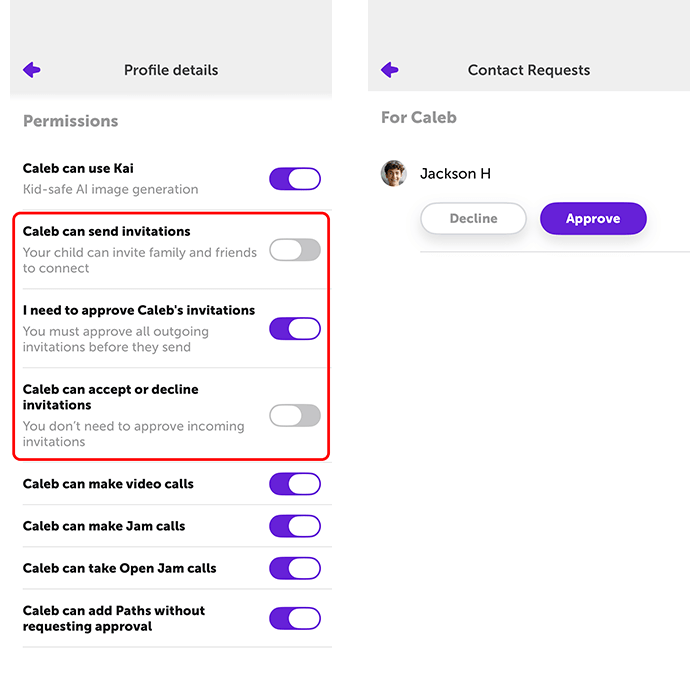
As your child grows more comfortable, you can hand them a small piece of the process. At this level, your child can send invitations with your approval, and you still receive and approve every contact who wants to connect with them.
This is a gentle first taste of independence. Your child feels the agency of reaching out to a friend or relative, while you remain the checkpoint on both outgoing and incoming connections. It is a natural stepping stone that builds confidence without removing oversight.
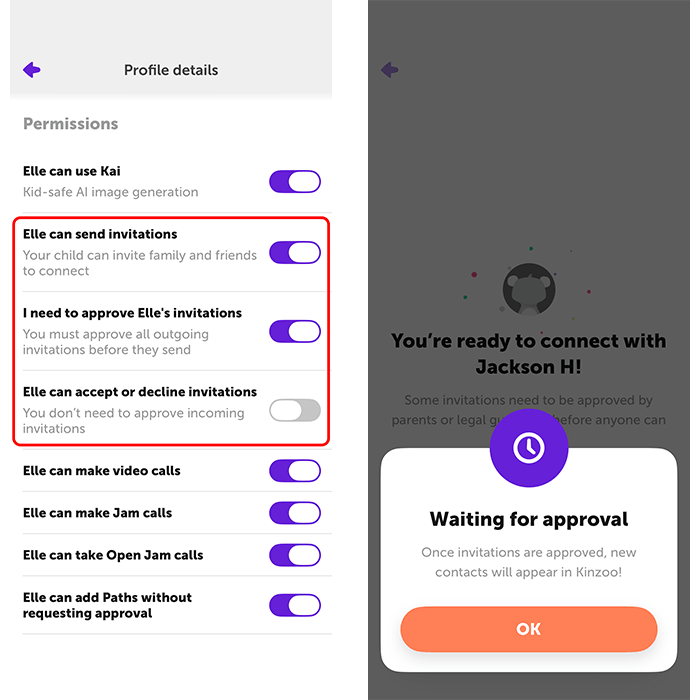
Level three: kids manage their own connections, with a report to you
At this stage, your child can send, receive and approve their own invitations, managing their connections the way an older kid or teen is ready to, without needing your sign-off on every request.
Even here, you are never in the dark. Parents still receive a report on the connections their child makes, so you always have visibility into who is entering their world. It is independence with accountability, which is exactly the balance a growing kid and a caring parent both need.

How to choose the right level for your child
There is no single correct answer, and that is the point. A five-year-old and a twelve-year-old have very different needs, and the same child changes enormously from one year to the next. Kinzoo Messenger is built to move with them, so the app your child uses in kindergarten can still be the right fit in middle school.
The best approach is to start conservatively and move up as your child is ready. If a level ever feels like too much, you can dial it back at any time. These are not one-way doors, they are settings you revisit together as trust grows. That ongoing conversation, with you setting the pace, is what a kid-friendly messenger is really for.
FAQs
What is the safest way for my kid to connect with family and friends?
The safest approach is a messenger where you control who can reach your child. Kinzoo's invitation permissions let you approve every new contact, so your child connects only with people you trust.
Can I change my child's permission level later?
Yes. All four levels are adjustable at any time. You can start with full parental oversight and move up as your child matures, or dial a level back if it no longer feels right.
Does my child ever get to add their own contacts?
That depends on the level you choose. Higher levels let your child send and even approve their own invitations, while lower levels keep you in charge of every contact.
Will I still know who my child is talking to at the most independent level?
Yes. Even when your child manages their own connections, parents still receive a report on those connections, so you always have visibility.
Is Kinzoo Messenger appropriate for younger kids?
Yes. The platform is designed to help younger children and first-time users, giving them a simple, warm messaging experience while you manage every invitation on their behalf.